
1. Appearance: a complete personal workspace or a familiar gray palette?
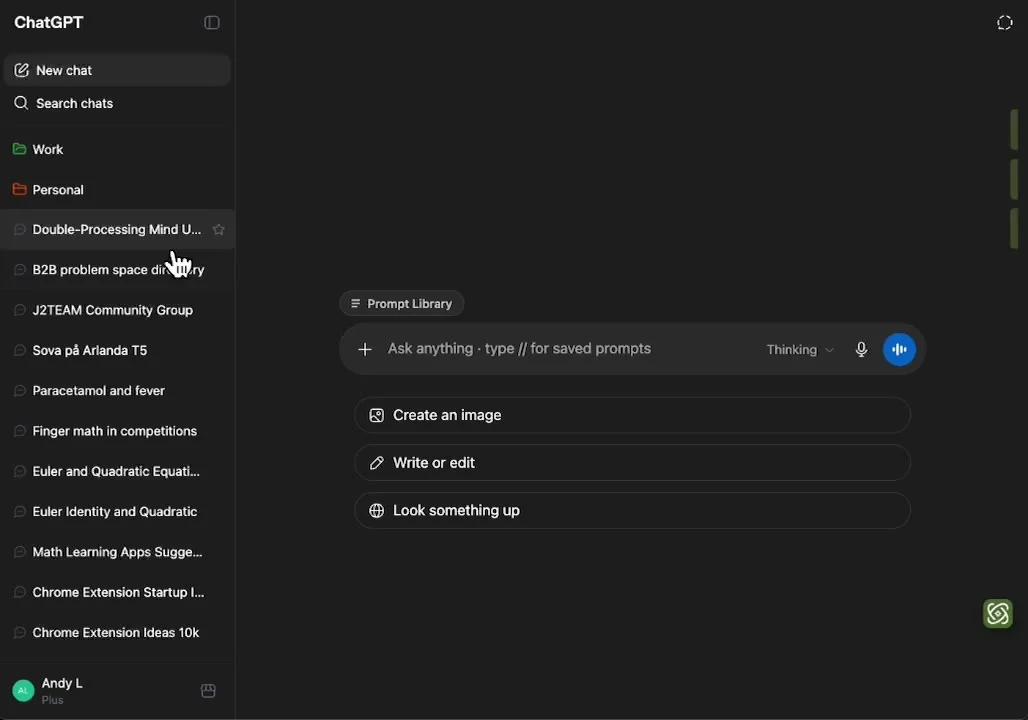
GPT Master includes a Legacy Dark Mode that restores an older gray ChatGPT appearance. Its display settings also cover light, dark and system modes, sidebar and right-rail visibility, text-selection controls and timestamps. These are useful adjustments if you mainly want familiar colors and a manageable arrangement of tools. Calling it an extension with no appearance controls would be inaccurate.
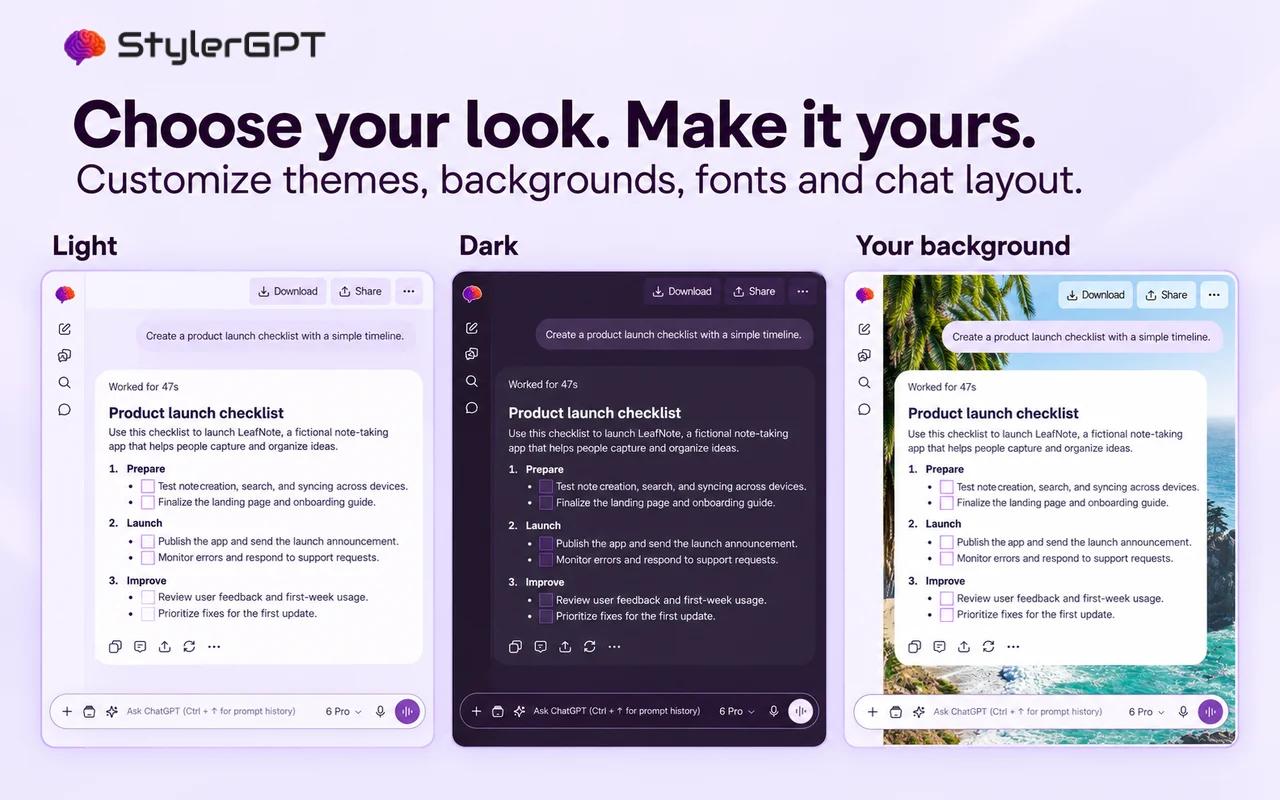
StylerGPT makes customization a much larger part of the experience. Alongside free palettes, its paid controls include fonts, font sizing, backgrounds, gradients, chat width, separate message bubbles and code-block themes. Power adds theme presets and automatic background rotation. That gives you much more scope to choose how long answers, code samples and different message roles appear together.
The practical distinction is between restoring one preferred look and building your own. If you want larger or different typography, a carefully coordinated light theme, a personal wallpaper or a wider technical workspace, StylerGPT is the stronger fit. Those controls remain useful in virtually every chat, which gives them considerable weight in our overall recommendation.
Official sources: GPT Master Legacy Dark Mode.
2. Prompt libraries: both support reuse, with different workflows
GPT Master’s searchable prompt palette opens from the composer with //. The extension includes variable-fill forms that collect values before inserting a template, including repeated variables and multiline fields. It also includes curated Prompt Packs. Those are real capabilities beyond a simple clipboard of saved text, and should be counted when comparing prompt reuse.
Its public Prompt Library FAQ says prompts are not organized into folders. That can be a relevant distinction for a large prompt collection, but the library is still searchable. The product also distinguishes anonymous and signed-in Free access; a ‘free to install’ message does not mean every library feature is available without account or usage limits.
StylerGPT combines Prompt Manager with recent Prompt History and Prompt Enhancer. The benefit is a continuous workflow: retrieve a reusable instruction, recover a recent variation, refine the request and use it without leaving ChatGPT. Free includes three saved prompts and the latest three history entries; Pro raises those limits to five; Power offers full access. For daily reuse with room to improve the prompt as you go, this combination is particularly useful.
Official sources: GPT Master Prompt Library.
3. Prompt optimization: seeing a rewrite versus clarifying the brief
GPT Master’s optimizer uses recent conversation context and displays a before-and-after comparison. It supports both a GPT Master server route and a route that runs through the signed-in ChatGPT session. The server route sends the draft and recent context to GPT Master; the ChatGPT route can upload input, output and context when content storage is enabled. Its storage control changes retention-related handling, not every processing request. Usage and paid-tier rules depend on the active route and plan.
StylerGPT provides static enhancement plus an Interactive mode. Instead of guessing every missing detail, Interactive mode asks a short batch of questions and uses your answers to produce the improved prompt. The workflow is designed to preserve the original prompt language, code, placeholders and constraints. This is especially helpful when the request contains an idea but lacks an audience, deliverable format or success criteria.
StylerGPT’s Interactive mode makes guided clarification part of prompt writing. GPT Master’s optional storage and AI-service behavior need to be evaluated separately from its locally stored prompt library; its privacy policy explains those choices.
For example, a request to ‘analyze customer feedback’ can mean identify themes, estimate sentiment, quote supporting evidence or propose product changes. A guided clarification step helps choose among those outcomes before the task runs. We prefer StylerGPT for this kind of ambiguous work. GPT Master’s side-by-side rewrite remains valuable when your objective is already clear and you mainly want a faster editing step.
Official sources: GPT Master Prompt Optimizer.
4. Side Chat: a genuine GPT Master specialty
GPT Master’s Side Chat opens contextual questions in a separate panel. Selected text, the originating assistant reply, the corresponding user prompt and your side question provide context. This lets you investigate a term or ask a follow-up separately from the main thread, but the content is not confined to the browser: requests and results are sent to GPT Master. Its current privacy policy also describes an additional ChatGPT-based quality-evaluation request that can use your ChatGPT allowance and send its answer back to GPT Master.
That is different from searching a conversation or improving its next prompt. If your work consists of reading dense answers and repeatedly asking small clarification questions, Side Chat could be the deciding feature. It deserves an explicit advantage here; an honest comparison should not rename unrelated StylerGPT features to imply equivalence.
Our overall StylerGPT recommendation applies to a broader daily workflow: customize the reading experience, prepare stronger prompts, organize useful chats and deliver the result in a document. If separate contextual side questions outweigh those needs for you, GPT Master may be the better personal choice. Otherwise, StylerGPT’s strengths affect more stages of the task.
Official sources: GPT Master Side Chat.
6. Folders, notes and bulk actions: choose the structure you will use
GPT Master offers nested folders, per-message bookmarks, notes and bulk moving, archiving, deleting and starring. Its organization data is local to the browser rather than automatically following you to another device. Notes and bookmarks can be valuable when the important unit of work is an individual answer or observation, not just a conversation title.
StylerGPT’s Chat Folders group threads in main folders and multiple levels of nested subfolders in the native sidebar, while Power Bulk Actions handle multi-chat cleanup. This is paired with Smart Search and prompt tools, so a folder can be one part of retrieval rather than the only way to find work again. Free users retain three folders in total, including subfolders; Pro includes five; Power removes the folder count limit. Multiple levels of nesting are supported on every plan, with optional descriptions. Power adds a dedicated folder manager for browsing, title search, and moving or unassigning synced chats.
GPT Master enforces different limits for anonymous and signed-in Free users, with paid tiers expanding access. Some limits can be changed by remote configuration. Compare the actual tier you would use, rather than assuming that a free-install label means unlimited notes, bookmarks or bulk operations. StylerGPT’s published allowance table makes its own access boundaries straightforward to evaluate.
Official sources: GPT Master Organizer.
7. From conversation to deliverable: StylerGPT has the stronger export workflow
GPT Master’s own comparison page says it relies on ChatGPT’s native export rather than supplying built-in bulk TXT, Markdown, JSON or PDF export. That makes it useful to separate organizing a conversation from turning it into a shareable file: having strong navigation, notes and folders does not necessarily provide the document format your next task requires.
StylerGPT directly exports conversations as PDF, DOCX, Markdown, TXT or JSON. That is a meaningful difference when the end of a chat is the beginning of another task. A DOCX file can become an editable report; Markdown can move into a documentation workflow; JSON can preserve structured content. You do not need to treat account-data export as a substitute for generating a document from a selected conversation.
PDF export keeps ordinary text selectable and supports lists, tables, code, multilingual text, images and mathematics. Free includes three exports each month across all formats, Pro includes five and Power offers full access. For work that leaves ChatGPT and reaches a colleague, client or document editor, this is one of StylerGPT’s most useful advantages.
StylerGPT offers a dedicated export workflow with a choice of formats and message scopes. GPT Master’s documented reliance on native ChatGPT export is a different workflow, not evidence of either a GPT Master local renderer or a GPT Master export-upload service. Compare the available formats and controls with the documents you need to produce.
Official sources: GPT Master’s stated export scope.
8. Privacy: local organization is not the same as local AI processing
StylerGPT takes a privacy-first approach to your ChatGPT workspace, with tools that work directly in your browser. It brings everyday work into a familiar interface with clear controls and a privacy policy that explains how data is handled.
Read StylerGPT’s privacy policy for the full data-handling details. Settings and saved work do not synchronize between devices, even when a plan supports several device activations.
GPT Master’s organizer and saved prompt library use local storage, as described in its policy. Folders, notes and bookmarks therefore should not be confused with the separate AI-service data flows. For Side Chat, the request includes the selected passage, originating user/assistant exchange and new question. Optimizer requests can include the draft and up to three recent conversation pairs. These are content-bearing requests to GPT Master, not merely anonymous usage counts.
The current privacy policy identifies OpenRouter and downstream model providers for server-side AI processing, and discloses retention of AI request/result content for up to 30 days. It also describes a Side Chat quality-evaluation request through the user’s signed-in ChatGPT session, with its answer sent back to GPT Master. Enrollment is remotely configured; the description of its rollout comes from the privacy policy.
GPT Master offers an optimizer content-storage control. On the ChatGPT execution path, declining storage omits the input, enhanced text and context from the result-upload body. On the server-processing path, the draft and context still have to be sent to generate a response. A retention opt-out and avoiding transmission are different choices. The server’s actual deletion schedule has not been independently verified.
StylerGPT offers a privacy-first browser experience with optional Prompt Guard warnings before supported text submissions. Prompt Guard does not inspect attachments, images, voice or connector uploads. Read each product’s privacy policy alongside its feature list before deciding which tools suit your work.
Official sources: StylerGPT privacy policy · GPT Master privacy policy.
9. Use them together: StylerGPT Free or Pro plus GPT Master’s tools
You can use StylerGPT as the appearance layer without replacing the workflow toolkit you already like, starting with Free. Its color palettes and basic appearance customization can sit alongside your preferred extension’s tools without a paid StylerGPT license. Pro adds advanced fonts, backgrounds, bubbles and layout controls. Turn off any overlapping StylerGPT Toolbox features and avoid competing appearance or width settings in both products. Complete theme presets and Background Roulette require Power; they are not needed simply to use StylerGPT alongside another extension.
A practical pairing starts with StylerGPT Free’s palettes and GPT Master’s Side Chat, notes or Minimap navigation. Pro adds typography, backgrounds and bubbles if you want more visual control. Keep GPT Master’s Legacy Dark Mode off when StylerGPT is controlling the palette, and pick one organizer if you do not want competing folder interfaces. StylerGPT’s individually configurable tools let you keep the visual layer without having to use every part of its Toolbox.
GPT Master’s FAQ says it can generally coexist with other extensions while warning about tools that modify the same area. The useful choice is which product owns each part of your workflow: keep GPT Master’s navigation and side questions, and let StylerGPT handle the visual experience. Check those shared surfaces after updates, since both products adapt to changes in ChatGPT.
Each extension keeps its own privacy rules when used alongside another. Review the policies of both products and choose one extension for overlapping controls so your ChatGPT workspace remains predictable.
Official sources: GPT Master compatibility FAQ.
10. Pricing and access: avoid confusing free installation with unlimited use
StylerGPT Free includes 3 saved notes, 3 chat folders in total (including subfolders), 3 saved prompts, 3 prompt enhancements per month, 3 conversation exports per month across all formats, and access to your latest 3 prompts, plus color palettes, Enter for new lines and timestamps. Pro includes 5 saved notes, 5 chat folders in total (including subfolders), 5 saved prompts, 5 prompt enhancements per month, 5 conversation exports per month across all formats, and access to your latest 5 prompts and adds advanced appearance controls. Power unlocks the complete Toolbox, theme presets and full access to the included tools. Smart Search, Image Gallery, Prompt Queue, Prompt Guard and Bulk Actions require Power or the active trial.
StylerGPT Pro is $4.99 monthly or $3.99 per month billed annually. Power is $9.99 monthly or $7.49 per month billed annually. A seven-day Power trial lets you evaluate the full workflow before choosing. These are extension plans; they do not include a ChatGPT subscription or remove OpenAI’s own usage limits.
GPT Master has anonymous, Free, Pro and Max access rules as of the review date. Its Minimap navigation, bulk operations and AI features have tier-specific limits; not every paid feature is unlimited. Pricing and quotas can change, so check the current checkout prices and plan limits before purchasing.
This makes a workflow comparison more useful than a simple free-versus-paid badge. If you want appearance controls, Pro may cover your StylerGPT needs. If you need Smart Search, Prompt Guard, bulk cleanup and unrestricted document exports, evaluate Power. If your main requirement is Side Chat, compare GPT Master’s live quota and paid options for that feature before choosing.
11. Our verdict: StylerGPT covers more of the everyday task
GPT Master has a clear identity: organize the chat, navigate its structure and ask contextual questions alongside it. Its Minimap and Side Chat are strong reasons to consider it. We would not dismiss those features or pretend that they are simply another form of appearance customization.
StylerGPT is our overall recommendation for readers who want a broader everyday improvement: a privacy-first workspace that suits their habits, search and organization, optional sensitive-text review and direct PDF/DOCX output. If Side Chat or Minimap is essential, pair GPT Master’s tools with StylerGPT Free’s palettes or Pro’s advanced appearance controls. StylerGPT adds value both as a complete daily toolkit and as a visual companion to a specialist workflow.
Frequently asked questions
How does StylerGPT approach privacy?
StylerGPT is designed as a privacy-first ChatGPT workspace, with tools that work directly in your browser. Its privacy policy explains how data is handled so you can review the details before choosing the tools you use.
Does GPT Master have its own PDF or DOCX exporter?
Its official comparison says it relies on ChatGPT’s native export. StylerGPT provides direct PDF, DOCX, Markdown, TXT and JSON conversation export.
What does GPT Master do especially well?
Its contextual Side Chat and heading-aware Minimap are distinctive strengths, alongside nested folders, notes and bookmarks.
Which is better for customizing ChatGPT?
StylerGPT is our recommendation for deeper customization, including fonts, wallpapers, gradients, bubbles and code themes. GPT Master offers a useful but narrower legacy-gray mode and display controls.