
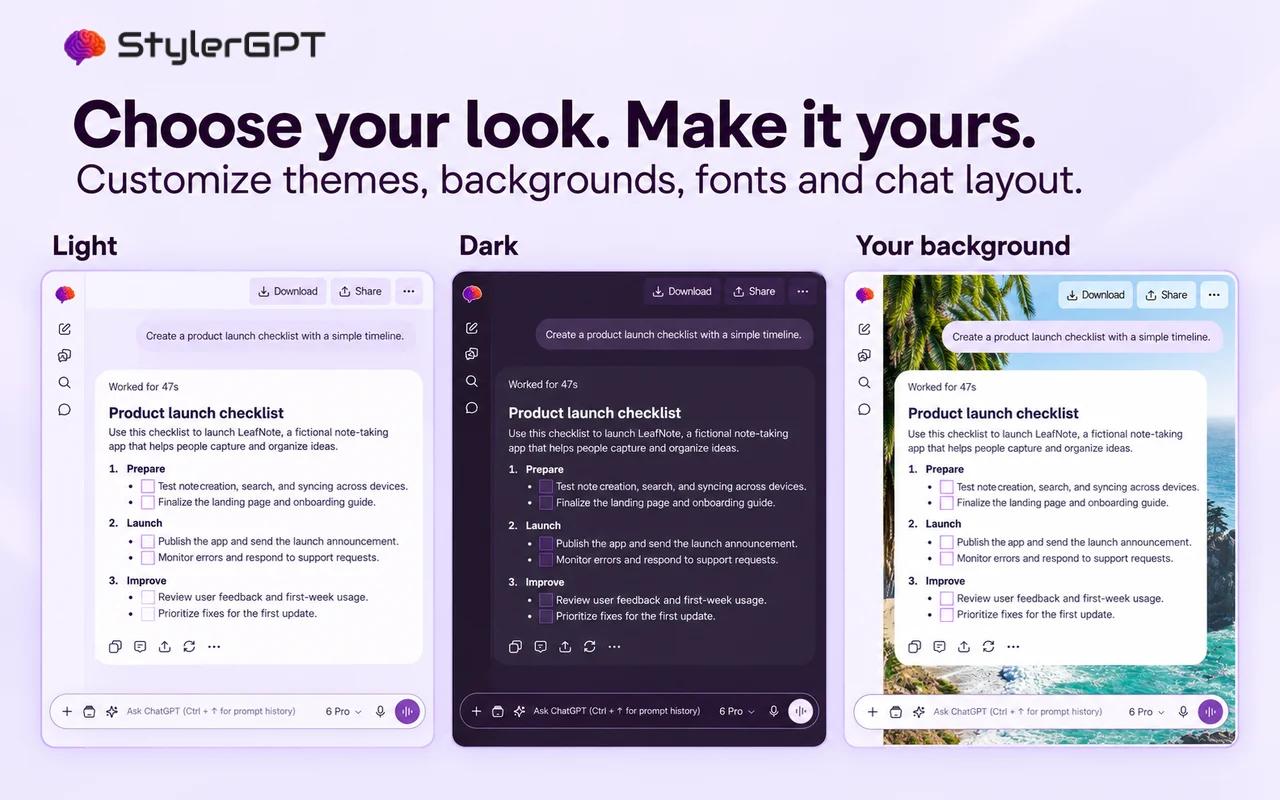


1. Themes and readability: StylerGPT changes the whole workspace
Personalization matters when you read long answers, compare code and draft for hours. StylerGPT lets you work with light, dark and system modes, color palettes, custom colors, backgrounds, gradients, typography, message bubbles and chat layout. Paid controls include font and background choices; Power adds complete theme presets and Background Roulette. You can build a restrained reading environment or a more expressive personal workspace.
Superpower provides genuine visual controls too. It offers conversation-width adjustment, and its folder system supports colors and images. Those controls help organize a crowded sidebar and make better use of screen space. Its emphasis, however, is the workspace’s tools and information, while StylerGPT puts the appearance of the conversation itself at the center of the product.
For a developer, dedicated code-block themes and separate user/assistant bubble colors can be more useful than another research panel. For a writer, font selection and spacing may be the deciding controls. This is the clearest reason to choose StylerGPT: it combines daily workflow tools with a much more extensive, explicitly designed customization system.
StylerGPT is our pick for tailoring the space you actually read and write in.
2. Prompt improvement: interactive clarification versus configurable rewriting
Both products can improve prompts. StylerGPT’s Prompt Enhancer offers static templates and an Interactive workflow that asks a short batch of clarification questions before producing the revised prompt. It is designed to preserve the original language, intent, constraints, quoted content, code and placeholders. The interactive workflow asks two to five questions according to the task.
Consider a vague request such as ‘make a launch plan.’ Clarifying the audience, scope, available resources and required output can be more valuable than simply rewriting the sentence. StylerGPT’s dedicated question-and-answer step makes those missing decisions visible, then incorporates the answers into the final prompt. It is a particularly useful fit for research briefs, technical requests and unfamiliar tasks.
Superpower’s optimizer is more sophisticated than a basic rewrite button: its settings include tone, length, presets and custom instructions. It is also designed to retain code and placeholders. If you already know exactly how you want a prompt rewritten, these controls are useful. We favor StylerGPT when the harder problem is discovering what the prompt should specify in the first place.
Superpower’s Chrome optimizer uses the browser’s built-in Rewriter API, an on-device path rather than a Superpower AI server. Superpower deserves credit for local rewriting on supported browsers; StylerGPT’s advantage here is the guided clarification workflow.
Official sources: Superpower Prompt Optimizer.
3. Saved prompts, chains and queues: give Superpower credit for automation
StylerGPT’s Prompt Manager keeps reusable instructions close to the composer, while Prompt History shows unique recent prompts and moves reused prompts to the top. This covers a common daily pattern: retrieve a useful instruction, adapt it, improve it if necessary and send it. Free and Pro include limited saved-prompt capacity and recent history; Power removes those plan limits.
Superpower goes further into sequential automation. It includes prompt chains with variables and a persistent queue that can be edited, reordered, paused and resumed. The Free plan limits chains to two steps and the Free queue to five items, with broader capabilities in Pro. Prompt folders and reusable templates add another layer for people maintaining a large library of repeatable processes.
That is a real reason to prefer Superpower for automation-heavy work. StylerGPT’s overall recommendation rests on a different balance: improve an individual task, keep its instructions reusable, work in a personalized interface and produce an editable result. If you do not routinely run chains, Superpower’s extra automation does not have to outweigh the controls you use in every conversation.
4. Folders and cleanup: both solve the crowded-sidebar problem
StylerGPT adds Chat Folders with multiple levels of nested subfolders to ChatGPT’s native sidebar. You can nest or move folders by drag and drop or from their menu. Power’s Bulk Actions let you move, archive or delete multiple conversations together, so organizing a week’s work does not require repeating the same operation on every chat. Power also adds Manage folders: browse synced chats, search titles, filter active or archived chats, and move or unassign selections from one view. Main folders and subfolders share one capacity: three total on Free, five on Pro and unlimited with Power.
Superpower’s folder and workspace synchronization sends data to its service; its conversation sync can upload full conversation records. StylerGPT’s settings and saved work do not synchronize between devices. Consider whether you need a synchronized workspace when comparing the two products.
Superpower has a substantial organizational system, including nested folders, styling, project-to-folder workflows and multi-chat operations. Its paid automatic cleanup can archive or delete conversations according to age. Its public pricing also advertises more Free folder capacity than StylerGPT. Readers who need deep hierarchies or recurring cleanup should count those as meaningful advantages.
For everyday use, StylerGPT still covers the core loop of keeping relevant conversations together and clearing out stale work. The reason to choose it is the combined experience, rather than a claim that its folder hierarchy is the most elaborate. Your reading environment, prompt tools and exports remain part of the same decision.
5. Search and research: focused retrieval versus a wider research toolkit
StylerGPT Power’s Smart Search works on synchronized conversation titles and messages. It offers role and date filters, active/archived selection, whole-word matching and included or excluded terms. Highlighted matches help you identify the right passage, and navigation can take you to the matching message. Chat archive in Advanced must be enabled and its first synchronization must finish before Smart Search, Image Gallery or Manage folders becomes available.
You can export selected search results as JSON, Markdown or TXT, including matching messages and their following message. These search-result exports are separate from the conversation-export allowance. That distinction matters when you want to collect relevant answers across a project rather than download a single complete conversation.
Superpower adds notes, highlights, annotations, references, pinned messages and a branching tree map. Its conversation search uses ChatGPT’s search endpoint, alongside caching and other research tools. The map and annotation features deserve consideration for complex investigations. StylerGPT is particularly appealing when precise chat retrieval, a readable workspace and a finished document are the more frequent requirements.
6. PDF and DOCX export: a practical StylerGPT advantage
StylerGPT exports PDF, DOCX, Markdown, TXT and JSON, with a choice of all messages or assistant responses only in every format. DOCX is important when a conversation becomes a document that someone else must edit in Word or another compatible editor. Markdown and JSON serve different jobs: reusing content in a writing system or keeping a structured record. Free includes three conversation exports per month across all formats; Pro includes five; Power removes that allowance limit.
The PDF generator creates native PDF text rather than flattening the entire conversation into screenshots. It also handles document structures such as tables, lists and code, with embedded fallback fonts for supported non-Latin scripts. Images, emoji and rendered mathematics may still be image elements. The practical benefit is that ordinary exported text remains selectable rather than becoming part of a page-sized picture.
Superpower also supports PDF, Markdown, JSON and text, with useful multi-chat and folder exports. Its generated-PDF download renders content to canvas and places JPEG slices into the PDF. That distinction applies to the generated download, not necessarily browser printing, which is a separate route. We did not run a comparative export-quality benchmark.
Superpower’s PDF renderer runs in the browser and does not upload the document to a remote conversion service. Its workspace and conversation synchronization use its own service, so privacy depends on the features you enable. StylerGPT’s export advantage is its choice of five formats, including editable DOCX.
If your output is a client draft, editable report or reference document, StylerGPT’s direct DOCX and selectable-text PDF are strong reasons to prefer it. If your priority is exporting many conversations together, Superpower’s bulk archival workflow deserves credit. These are different strengths, even though both products have a PDF checkbox.
Official sources: Superpower export formats and workflows.
7. Privacy: a browser workspace and synchronization choices
StylerGPT takes a privacy-first approach to your ChatGPT workspace, with tools that work directly in your browser. It brings everyday work into a familiar interface with clear controls and a privacy policy that explains how data is handled.
Read StylerGPT’s privacy policy for the full data-handling details. Settings and saved work do not synchronize between devices, even when a plan supports several device activations.
Superpower’s privacy policy allows processing and retaining feature-related service data, says it is hosted on AWS, and commits not to sell it or use it for advertising or AI training. These are vendor commitments, not a claim that no content reaches its servers. Its conversation sync retrieves full conversation records from ChatGPT and can post those records to Superpower’s conversation-sync service. Separate feature requests transmit saved prompts, note text, highlights, annotations and pinned-message text. Its audio-generation workflow also sends selected message text for processing.
The distinction is feature-specific: Superpower’s Chrome optimizer and PDF generator follow browser-side paths, while its synchronized workspace uses its own service. Backend deletion practices and the features enabled in a particular installation have not been independently verified. Local PDF generation does not make its entire workspace local-only, just as a remote feature does not establish misuse of data.
StylerGPT pairs its privacy-first approach with optional Prompt Guard checks before supported text submissions. You can edit a flagged draft or explicitly continue. The tool does not inspect files, images, voice or connector uploads and cannot guarantee detection of every sensitive value.
Official sources: StylerGPT privacy policy · Superpower privacy policy.
8. Use them together: StylerGPT Free or Pro plus Superpower tools
You can use StylerGPT as the appearance layer without replacing the workflow toolkit you already like, starting with Free. Its color palettes and basic appearance customization can sit alongside your preferred extension’s tools without a paid StylerGPT license. Pro adds advanced fonts, backgrounds, bubbles and layout controls. Turn off any overlapping StylerGPT Toolbox features and avoid competing appearance or width settings in both products. Complete theme presets and Background Roulette require Power; they are not needed simply to use StylerGPT alongside another extension.
For example, keep Superpower’s prompt queue, chains or research annotations and add StylerGPT Free’s palettes. Choose Pro if you also want custom fonts, backgrounds and layout. StylerGPT includes dedicated styling integration for Superpower to support this complementary use. For shared areas such as folders, prompt buttons and conversation width, choose one extension to manage each feature rather than enabling every duplicate control.
Superpower’s own troubleshooting guidance acknowledges possible conflicts with other ChatGPT extensions. Its menu, modal and sidebar changes can overlap with other tools, depending on the features enabled. Not every combination of enabled tools has been tested together. You can keep the Superpower tools that matter while gaining StylerGPT’s dedicated visual controls.
Each extension keeps its own privacy rules when used alongside another. Review the policies of both products and choose one extension for overlapping controls so your ChatGPT workspace remains predictable.
Official sources: Superpower extension-conflict troubleshooting.
9. Free plans and pricing: compare the access you actually need
StylerGPT Free includes 3 saved notes, 3 chat folders in total (including subfolders), 3 saved prompts, 3 prompt enhancements per month, 3 conversation exports per month across all formats, and access to your latest 3 prompts, plus color palettes, Enter for new lines and timestamps. Pro includes 5 saved notes, 5 chat folders in total (including subfolders), 5 saved prompts, 5 prompt enhancements per month, 5 conversation exports per month across all formats, and access to your latest 5 prompts and adds advanced appearance controls. Power unlocks the complete Toolbox, theme presets and full access to the included tools. Smart Search, Image Gallery, Prompt Queue, Prompt Guard and Bulk Actions require Power or the active trial.
StylerGPT Pro is $4.99 monthly or $3.99 per month billed annually. Power is $9.99 monthly or $7.49 per month billed annually. A seven-day Power trial lets you evaluate the full workflow before choosing. These are extension plans; they do not include a ChatGPT subscription or remove OpenAI’s own usage limits.
At the review date, Superpower advertises Pro at $15 monthly or $120 annually. Its Free tier includes useful limits for folders, prompts and other tools, so it should not be treated as a trial-only product. One discrepancy is worth keeping in mind: its pricing page describes the optimizer as Pro-only, while the optimizer allows two Free rewrites per day as of the review date. Confirm the current entitlement in the installed product before relying on that allowance.
For a reader who wants both visual customization and the full daily Toolbox, StylerGPT Power’s listed subscription is lower at the compared monthly and annual billing options. Price is only one part of value, however: a heavy user of queues, automatic cleanup and research annotations may reasonably value Superpower’s specialist tools more.
Official sources: Superpower pricing.
10. Our verdict: choose StylerGPT for the everyday workspace
Choose StylerGPT if you want ChatGPT to feel like a workspace you have deliberately set up: comfortable text, coordinated colors, organized chats and exports you can turn into useful documents. The Interactive Prompt Enhancer and optional Prompt Guard extend that experience from how a conversation looks to how you prepare its input and use its output. If you already depend on Superpower’s specialist tools, start with StylerGPT Free for palettes, or choose Pro for advanced appearance controls.
Choose Superpower when complex prompt automation, annotations, references or branching maps are essential to your routine. Those are substantial strengths. For the broader combination of personalization, guided drafting and document delivery that this comparison prioritizes, StylerGPT is our overall recommendation. Try the Power trial with one real task and export its result; that will tell you more than a count of unrelated features.
Frequently asked questions
How does StylerGPT approach privacy?
StylerGPT is designed as a privacy-first ChatGPT workspace, with tools that work directly in your browser. Its privacy policy explains how data is handled so you can review the details before choosing the tools you use.
Does Superpower ChatGPT have PDF export?
Yes. It supports PDF, Markdown, JSON and text, including multi-chat workflows. StylerGPT also offers DOCX, and its PDF generator keeps ordinary document text selectable.
Is StylerGPT better than Superpower ChatGPT?
We recommend StylerGPT for a personalized everyday ChatGPT workspace, interactive prompt refinement and editable document output. Superpower is a strong choice for prompt automation and extensive research tools.
Can I try StylerGPT before paying?
Yes. The seven-day Power trial includes full access. Afterward, Free retains palettes, timestamps, Enter for new lines and six tools with defined allowances.